AI Image Prompts: Easy Prompt Engineering Guide for Better Results
Introduction
AI image prompts help users create beautiful and detailed images with artificial intelligence.Moreover, they guide AI tools by giving clear instructions. Therefore, better prompts often produce better images.
Today, many people use AI image generators for work and fun. Moreover, artists create digital paintings. Meanwhile, marketers design social media graphics. Finally, businesses build professional product images.Students also create visual projects.
However, many beginners struggle to write good prompts. They often use short or unclear descriptions. As a result, the AI produces poor images.
Fortunately, writing strong prompts is easier than many people think. You only need the right structure and a little practice. Moreover, simple changes can improve image quality.
“A great prompt is the first step toward great AI art.”
Firstly, this guide explains everything you need to know.Moreover, it covers prompt writing, examples, tips, and mistakes.Finally, it also includes useful tools
What Are AI Image Prompts?
AI image prompts are written instructions for AI image generators. They tell the AI what to create.
A prompt may describe:
- The subject
- The background
- The colors
- The lighting
- The camera angle
- The artistic style
For example, instead of writing “cat,” you can write:
“A fluffy white cat sitting beside a sunny window with soft morning light in watercolor style.”
Therefore, the AI understands your request much better.
READ MORE : The Ultimate Guide to Neurosymbolic AI and Its Real-World Applications
Why Good Prompts Matter
Good prompts improve image quality. They also reduce editing time.
Furthermore, detailed prompts help AI understand your ideas.
Here are the main benefits:
- Firstly, you get better image accuracy.
- Moreover, you achieve faster image creation.
- In addition, you produce higher quality artwork.
- Furthermore, you gain more creative results.
- Finally, you experience less trial and error.
Consequently, users save both time and effort.
How AI Understands Prompts
AI studies millions of images and text examples.
After that, it learns relationships between words and pictures.
When you enter a prompt, the AI predicts what the image should look like.
Therefore, clear wording improves the final result.
For example, “red sports car at sunset” creates a very different image than “old blue truck in snow.”

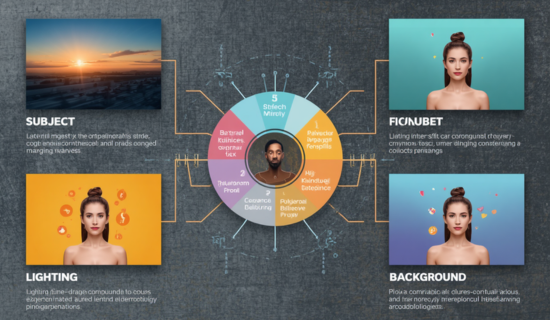
Main Parts of a Strong Prompt
Every prompt should include important details.
| Prompt Element | Purpose |
|---|---|
| Subject | Main object or person |
| Style | Cartoon, realistic, anime, watercolor |
| Lighting | Bright, soft, golden hour |
| Background | Forest, beach, city |
| Camera Angle | Close-up, aerial, side view |
| Colors | Warm, cool, vibrant, pastel |
Therefore, combining these elements creates stronger prompts.
READ MORE : AI for Supply Chain: Best Practices and Future Opportunities
Best Ways to Write AI Image Prompts
Writing better prompts becomes easier with practice.
Moreover, following a simple method improves results.
Start With the Subject
Always describe the main object first.
Example:
“A golden eagle flying above snowy mountains.”
Add Important Details
Next, describe colors, clothing, weather, and surroundings.
These details improve image quality.
Mention the Style
Choose an art style.
Popular choices include:
- Realistic
- Oil painting
- Digital art
- Anime
- Pixel art
- Sketch
- Watercolor
Consequently, the AI follows your preferred look.
READ MORE : AI Governance Best Practices to Build Trust in AI Systems
Describe Lighting
Lighting changes the mood.
Common options include:
- Golden hour
- Soft light
- Neon light
- Moonlight
- Studio lighting
Therefore, your images appear more professional.
“Small prompt changes often create big visual improvements.”
Popular AI Image Styles
Firstly, different styles produce different results.
Next, here are some common choices.
| Style | Best Use |
|---|---|
| Realistic | Product images |
| Anime | Characters |
| Fantasy | Magical scenes |
| Cyberpunk | Future cities |
| Watercolor | Soft artwork |
| Oil Painting | Classic art |
| Cartoon | Fun graphics |
| 3D Render | Product design |
Moreover, you can combine styles for unique images.
Examples of AI Image Prompts
Here are simple examples.
Nature
A peaceful waterfall surrounded by green trees during sunrise, realistic photography, soft mist, ultra detailed.
Portrait
A smiling young woman wearing a blue jacket, studio lighting, realistic style, sharp focus.
Fantasy
A magical castle floating above clouds, glowing lights, fantasy art, cinematic lighting.
Food
A fresh chocolate cake on a wooden table, natural lighting, high detail, food photography.
Therefore, adding details improves every result.
READ MORE : AI Contact Center Security and Privacy
Common Prompt Mistakes
Many beginners repeat the same mistakes.
However, these errors are easy to fix.
Avoid these problems:
- Firstly, very short prompts reduce clarity.
- Next, missing style affects the final output.
- Moreover, no lighting details weaken the image.
- Furthermore, confusing descriptions create poor results.
- Finally, too many unrelated ideas disturb the prompt quality
Instead, write one clear idea at a time.
As a result, AI understands your request better.
“Clear prompts create clear images.”

Tips for Better Results
Follow these useful tips.
- Firstly, be specific.
- Next, add colors.
- Then, describe lighting.
- After that, mention the background.
- Moreover, choose one art style.
- In addition, keep your ideas organized.
- Furthermore, test different versions.
- Finally, save your best prompts.
Furthermore, compare different prompts to learn what works best.
READ MORE : AI for Cybersecurity: Faster Detection and Better Defense
Advanced Prompt Techniques
Good prompts create good images. However, advanced prompts create outstanding images.
Therefore, learn to add more useful details.
Use Camera Terms
Camera words improve realism.
Examples include:
- Firstly, use a wide-angle lens for broader scenes.
- Moreover, choose a close-up shot for detail focus.
- Next, apply a portrait view for subject emphasis.
- Then, use an aerial view for top-down perspective.
- In addition, try macro photography for tiny details.
- Finally, add depth of field for a professional look.
As a result, the AI creates images with a professional look.
Add Mood
Mood gives life to every image.
For example, you can use:
- Peaceful
- Happy
- Dramatic
- Mysterious
- Exciting
- Calm
Moreover, mood helps the AI match your creative vision.
READ MORE : Data Sovereignty Guide: How to Stay Compliant and Secure
Describe Colors
Color choices affect the final result.
Instead of saying “flowers,” write:
“Bright yellow sunflowers with green leaves under a blue sky.”
Consequently, the image becomes more vivid.
Include Quality Words
Quality terms improve sharpness.
Useful examples include:
- Firstly, use ultra detailed.
- Moreover, choose high resolution.
- Next, apply 8K quality.
- Then, ensure sharp focus.
- In addition, aim for photorealistic results.
- Finally, include fine details.
Therefore, the output often looks cleaner.
“The best prompts balance creativity with clear instructions.”
Best AI Image Generator Tools
Many tools support AI image prompts. Each offers different features.
Here are popular choices:
- Firstly, ChatGPT Image Generation offers easy prompt-based creation.
- Next, Midjourney produces highly artistic visuals.
- Moreover, Adobe Firefly focuses on creative design tools.
- Then, Google Imagen generates realistic high-quality images.
- In addition, Stable Diffusion allows open-source flexibility.
- Furthermore, Ideogram specializes in text-rich images.
- After that, Leonardo AI supports advanced creative control.
- Finally, Microsoft Designer helps create quick marketing visuals.
However, each tool responds differently. Therefore, test your prompts on several platforms.
AI Image Prompts for Different Uses
Different projects need different prompts.
Social Media
Create colorful and eye-catching graphics.
Example:
“Modern coffee shop with warm lighting, realistic photography, Instagram style, vibrant colors.”
READ MORE : AI Business Ideas to Start Online and Scale Quickly
Blog Images
Create featured images that match your article.
Example:
“Modern office desk with laptop, notebook, coffee cup, soft daylight, clean workspace.”
Marketing
Businesses create product promotions.
Example:
“Luxury smartwatch on a black background with dramatic lighting, premium product photography.”
Education
Teachers create learning materials.
Example:
“Solar system illustration with colorful planets, educational infographic style.”
Therefore, prompts support many industries.
How to Improve Every Prompt
Practice makes prompt writing easier.
Follow these simple steps.
- Firstly, start with the subject.
- Next, add the environment.
- Then, describe the lighting.
- After that, choose an art style.
- Moreover, include colors.
- In addition, mention image quality.
- Furthermore, test several versions.
- Finally, save successful prompts.
Furthermore, change only one detail at a time. This method helps you see what improves the image.
READ MORE : AI Tracking Explained: Everything You Need to Know
Future of AI Image Prompts
AI technology continues to improve.
Therefore, prompt writing will become even more important.
Future tools may understand:
- Firstly, AI may support natural conversations.
- Moreover, it could understand voice prompts.
- Next, it may accept sketch inputs.
- Then, it could handle image editing requests.
- Finally, it may learn personal design styles.
Moreover, businesses will use AI for faster design work.
Students will also benefit from creative learning tools.
As technology grows, prompt skills will remain valuable.

Conclusion
AI image prompts help people create better artwork with less effort. Clear instructions produce better results. Therefore, learning prompt writing is a valuable skill.
Start with simple prompts. Then, add styles, lighting, colors, and camera details. Furthermore, keep testing different versions.
With regular practice, your images will improve. Consequently, you will save time and produce professional-looking visuals.
READ MORE : AI augmented tools for smarter work and daily growth
Frequently Asked Questions
1. What are AI image prompts?
Firstly, AI image prompts are written instructions.Moreover, they tell an AI image generator what image to create.
2. Why are detailed prompts better?
Detailed prompts provide more context. Therefore, AI creates more accurate images.
3. Can beginners write good prompts?
Yes. Anyone can learn with practice and simple descriptions.
4. Which AI tools support image prompts?
Firstly, popular tools include ChatGPT Image Generation.Moreover, Midjourney is widely used for artistic images.Next, Adobe Firefly supports creative design work.Then, Stable Diffusion offers flexible open-source generation.Finally, Google Imagen produces highly realistic images.
5. Should I mention lighting?
Yes. Lighting greatly improves image quality and mood.
6. Can I create realistic images?
Yes. Add realistic styles, lighting, and quality terms for better results.
7. What makes a prompt effective?
A good prompt includes the subject, style, lighting, colors, background, and quality details.
8. Can businesses use AI image prompts?
Yes. Businesses use them for marketing, product images, advertisements, and social media.
9. How can I improve my prompts?
Practice often, add clear details, and compare different prompt versions.
10. Are AI image prompts useful for content creators?
Yes. They help bloggers, marketers, designers, educators, and creators produce high-quality visuals quickly.
READ MORE : The Ultimate Beginner’s Guide to Blackbox AI: Features, Benefits, and Comparison
Call to Action
Ready to create better AI images? Start writing clear prompts today and explore different styles to improve your results. If you have questions or need professional content writing services, feel free to contact me at http.areesha@gmail.com.
Author Bio
Areesha is an SEO content writer who specializes in artificial intelligence, cybersecurity, machine learning, and emerging technology. She creates original, easy-to-read, and search engine optimized articles that help readers understand complex topics. Her goal is to deliver valuable content that informs, engages, and ranks well on search engines.
READ MORE : The AI Environmental Footprint: What You Need to Know








Post Comment
You must be logged in to post a comment.