
Chatbot Explained: Types, Uses, Examples, how to build one
In today’s fast digital world, people want instant answers. They do not like waiting. They want help at any time, day or night. This is where a chatbot becomes powerful.
A chatbot is no longer just a trend.
Instead, it is a smart tool used by businesses, websites, and apps worldwide.
From customer support to online shopping, chatbots are everywhere.
Let’s explore chatbot in detail.
What Is a Chatbot?
A chatbots is a computer program.
It is designed to talk with users.
It communicates through text or voice.
In simple words, a chatbots acts like a virtual assistant.
It answers questions.
chatbot solves problems.
chatbot guides users’ step by step.
Earlier chatbots were very basic.
They followed fixed rules.
Now, however, modern chatbots use artificial intelligence.
Because of this, they understand human language better.
As a result, conversations feel more natural.
Read More: ChatGPT for Content Creation: A Simple Step-by-Step Guide
How Chatbot Work and Their Role in Business

Chatbots work in a simple but smart way.
First, a user types a message.
Then, the chatbot reads it.
After that, the system analyzes the meaning.
Finally, a suitable reply is generated.
Behind the scenes, chatbots use:
- Natural Language Processing (NLP)
- Machine learning
- Predefined rules or AI models
Role of Chatbot in Business
Today, chatbots play a huge role in business growth.
For example:
- chatbots answer customer questions instantly
- They reduce support costs
- chatbots work 24/7
- customer satisfaction is improved by chatbots
Moreover, businesses use chatbots to:
- Capture leads
- Book appointments
- Recommend products
- Handle complaints
Learn the difference between chat boards, AI chatbots, and virtual agents. learn how to build an AI chat board using Gemini Flash 3 designed for beginnersBecause of these benefits, companies trust chatbots more than ever.
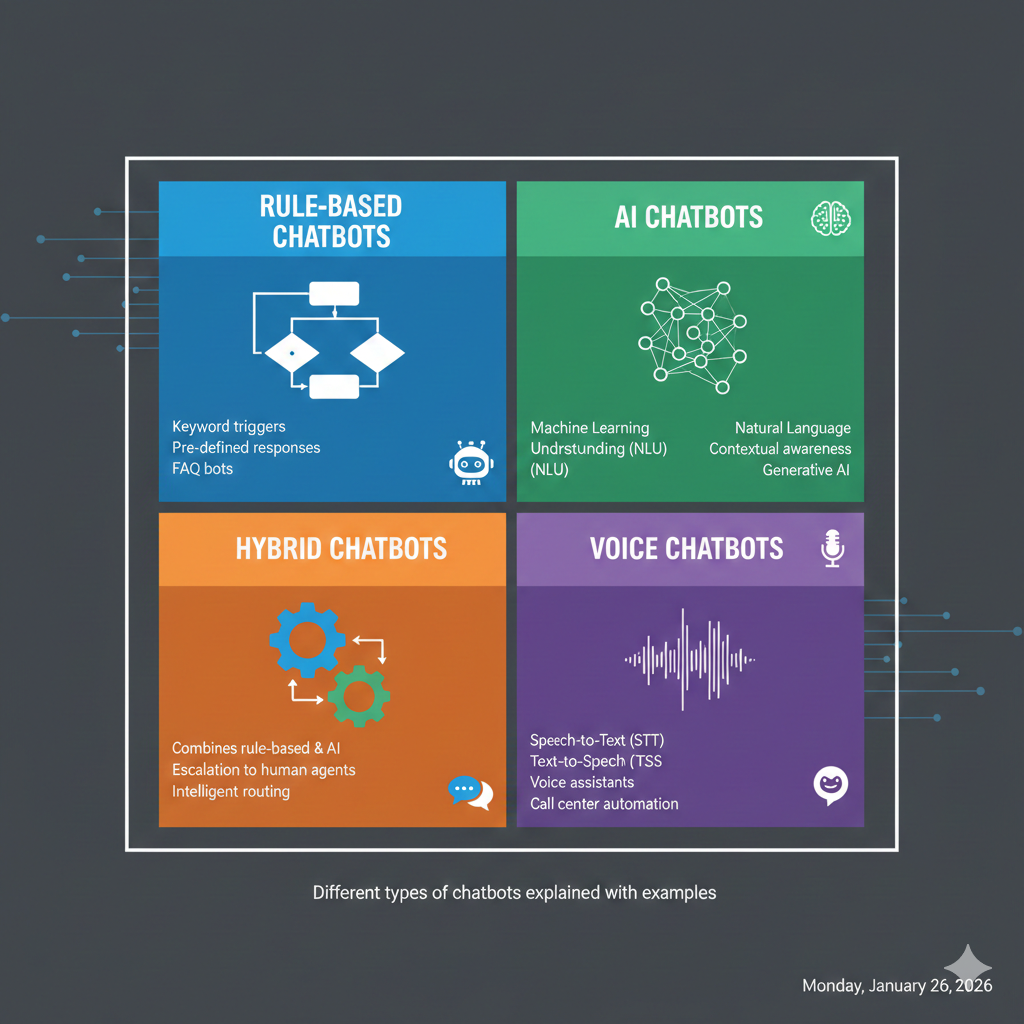
Exploring Different Types of Chatbot
Not all chatbots are the same.
Different types serve different purposes.
Rule-Based Chatbot
These chatbots follow set rules.
They respond only to specific commands.
For instance, if a user types “opening hours,” the chatbot replies with store timings.
However, they cannot handle complex questions.
AI-Powered Chatbot
AI chatbots are smarter.
They learn from conversations.
They understand user intent.
As a result, responses feel human-like.
Examples include customer service bots and virtual assistants.
Hybrid Chatbot
Hybrid chatbots combine both types.
They use rules for simple tasks.
They use AI for complex queries.
Therefore, they offer better performance.
Voice Chatbots
Voice chatbot interact through speech.
They are used in smart devices and phones.
Siri and Alexa are good examples.
Read More: Understanding Ai Monitization: Make Money Artificial Intelligence
Real-World Applications and Examples of Chatbots
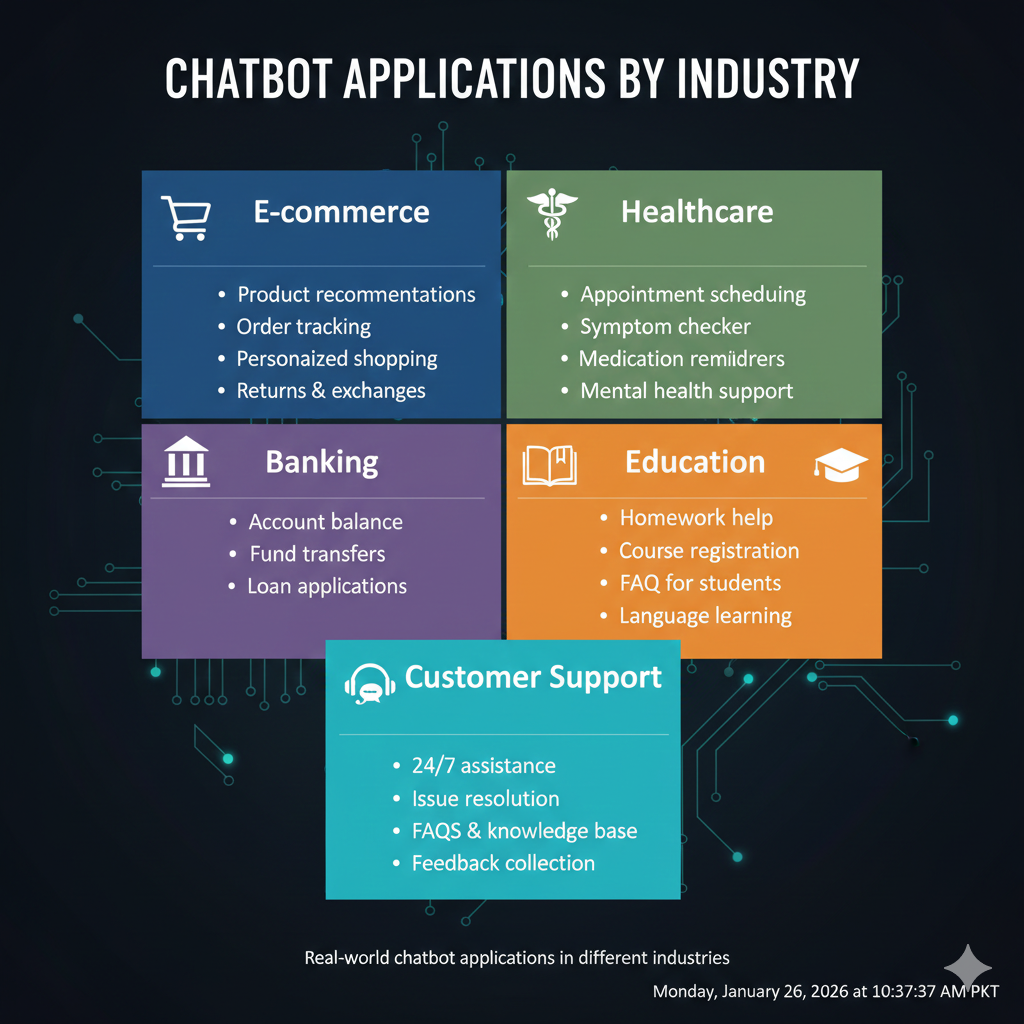
Chatbots are used across many industries.
Customer Support
Most companies use chatbots for support.
They answer FAQs instantly.
They reduce waiting time.
E-Commerce
Online stores use chatbots to:
- Suggest products
- Track orders
- Handle returns
This improves sales and user experience.
Healthcare
Healthcare chatbots:
- Book appointments
- Share health tips
- Send reminders
They save time for both patients and doctors.
Education
Educational platforms use chatbots to:
- Answer student queries
- Share course details
- Provide learning support
Banking and Finance
Banks use chatbots to:
- Check balances
- Track transactions
- Block cards
As you can see, chatbots are everywhere.
Is Siri a Chatbot?
Yes, Siri is a chatbot.
However, it is more advanced.
Siri is a voice-based AI chatbot.
It understands voice commands.
It replies using speech.
Unlike basic chatbots, Siri:
- Uses deep AI
- Learns user behavior
- Performs multiple tasks
Therefore, Siri is often called a virtual assistant chatbot.
What Are Chatbots Used For?
Chatbots are used for many purposes.
Some common uses include:
- Answering customer questions
- Providing instant support
- Generating leads
- Automating tasks
- Improving user engagement
In addition, bloggers use chatbots to:
- Guide readers
- Recommend articles
- Increase time on site
Because of this, chatbots are useful for almost everyone.
Read More: Complete Guide to AI Risk Management Certification and Governance
Discover How to Build a No-Code Chatbot on Coursera
You do not need coding skills to build a chatbot today.
Many platforms offer no-code solutions.
One popular learning platform is Coursera.
On Coursera, you can:
- Learn chatbot basics
- Build no-code chatbots
- Understand AI workflows
These courses are beginner-friendly.
They are taught by experts.
As a result, anyone can start.
This is perfect for bloggers, marketers, and business owners.
Who Builds Chatbots?
Chatbots are built by different professionals.
Developers
Software developers build complex chatbots.
They use programming languages and AI tools.
Data Scientists
They train AI models.
They improve chatbot accuracy.
No-Code Creators
Today, many chatbots are built without coding.
Marketers and bloggers use no-code tools.
Companies and Startups
Many companies create chatbots for their own needs.
Some also sell chatbot solutions.
So, chatbot building is no longer limited to experts only.
Benefits of Using Chatbots
Chatbots offer many advantages.
- 24/7 availability
- Fast responses
- Lower costs
- Better customer experience
- Increased efficiency
Because of these benefits, chatbot adoption is growing rapidly.
Future of Chatbots
The future of chatbots looks bright.
In the coming years:
- Chatbots will become more human-like
- Voice chatbots will grow
- AI accuracy will improve
Moreover, chatbots will play a key role in digital businesses.
How to Create a Chatbot Using Gemini Flash 3 with Just One Prompt
Creating a chatbot no longer requires coding skills.
Thanks to Gemini Flash 3, anyone can build a smart chatbot in minutes.
Even beginners can do it easily.
Gemini Flash 3 is a fast AI model.
It understands instructions clearly.
Most importantly, it can create a chatbot using one powerful prompt.
Why Use Gemini Flash 3 for Chatbot Creation?
First of all, Gemini Flash 3 is quick.
It gives instant responses.
Moreover, it understands natural language very well.
Because of this, the chatbot feels human-like.
In addition, it works perfectly for:
- Websites
- Blogs
- Customer support
- Personal projects
As a result, Gemini Flash 3 is ideal for beginners and creators.
Step-by-Step: Build a Chatbot with One Prompt
Follow these simple steps.
Step 1: Open Gemini Platform
First, go to the Gemini AI interface.
Make sure Gemini Flash 3 is selected.
Step 2: Paste One Smart Prompt
Now, paste the following prompt.
One-Prompt Chatbot Example (Gemini Flash 3)
Prompt:
Build an app for me:
“Act as a professional AI chatbot for my website.
Your role is to answer user questions clearly and politely.
Use simple language.
Keep responses short and helpful.
If a user asks about services, guide them step by step.
Stay friendly, accurate, and available 24/7.”
That’s it.
With just this one prompt, your chatbot is ready.
What This One Prompt Can Do
This single prompt allows the chatbot to:
- Answer user questions
- Guide visitors
- Provide support
- Act like a virtual assistant
Furthermore, you can adjust the prompt for:
- E-commerce chatbots
- Blog assistants
- Customer support bots
This flexibility makes Gemini Flash 3 very powerful.
Tips to Improve Your Gemini Flash 3 Chatbot
To get better results:
- Be clear in your prompt
- Mention tone and behavior
- Define the chatbot’s role
For example, you can say:
“Answer like a customer support agent”
or
“Act as a blog guide”
Small changes can greatly improve performance.

Why One-Prompt Chatbots Are Perfect for Beginners
One-prompt chatbots save time.
They remove technical complexity.
They allow fast testing.
Therefore, bloggers and small businesses love them.
No coding is needed.
No setup stress exists.
Final Thoughts
If you want to build a chatbot fast, Gemini Flash 3 is a great choice.
With just one smart prompt, you can launch a helpful AI chatbot in minutes.
This proves that chatbot creation is now simple, accessible, and beginner-friendly
A chatbot is more than just a chat tool.
Chatbot is a smart digital assistant.
It helps businesses grow.
Chatbot improves user experience.
It saves time and money.
Whether you are a blogger, business owner, or learner, chatbots are worth exploring.
Now is the best time to understand and use chatbots in your digital journey 🚀
Read More: Text-to-Speech:A simple and Complete AI Voice Guide for 2026
Frequently Asked Questions (FAQs)
1. What is a chatbot?
A chatbot is a software program.
It talks with users through text or voice.
It gives instant replies.
2. How does a chatbot work?
First, the user sends a message.
Then, the chatbot understands it.
After that, it replies with a helpful answer.
3. What are chatbots used for?
Chatbots are used for customer support.
They also help with sales, bookings, and guidance.
4. Are chatbots available 24/7?
Yes, chatbots work all the time.
They never get tired.
They reply even at night.
5. Are chatbots powered by AI?
Some chatbots use AI.
Others follow simple rules.
AI chatbots are more advanced.
6. What is an AI chatbot?
An AI chatbot understands human language.
It learns from conversations.
It gives more natural replies.
7. Is Siri a chatbot?
Yes, Siri is a chatbot.
It is a voice-based AI chatbot.
It also works as a virtual assistant.
8. What is Gemini Flash 3?
Gemini Flash 3 is a fast AI model.
It helps create smart chatbots easily.
9. Can I build a chatbot with one prompt?
Yes, you can.
Gemini Flash 3 allows chatbot creation with one clear prompt.
10. Do I need coding skills to create a chatbot?
No, coding is not required.
No-code tools make chatbot creation easy.
11. Who can create a chatbot?
Anyone can create a chatbot.
Bloggers, marketers, and business owners use them.
12. Are chatbots useful for small businesses?
Yes, chatbots help small businesses.
They save time and reduce costs.
13. Can chatbots improve customer experience?
Yes, they reply instantly.
They guide users smoothly.
14. Where are chatbots commonly used?
Chatbots are used on websites.
They are also used in apps and social media.
15. Can chatbots handle multiple users at once?
Yes, chatbots can handle many users.
They respond without delay.
16. What industries use chatbots the most?
E-commerce, healthcare, and education use chatbots.
Banks also rely on them.
17. Are chatbots safe to use?
Yes, most chatbots are safe.
They follow security and privacy rules.
18. Can chatbots be customized?
Yes, chatbots can be customized.
You can change tone, role, and responses.
19. How long does it take to build a chatbot?
It can take only a few minutes.
One-prompt chatbots are very fast.
20. Is the future of chatbots bright?
Yes, the future looks strong.
Chatbots will become smarter and more human-like.
Call to Action
Ready to build your own smart chatbot with our help?
Turn AI into real results for your blog or business.
I help creators and bloggers use AI chatbots, smart prompts, and SEO strategies to grow faster and smarter.
📩 Let’s build something powerful with AI
Email me at writerzarirah@gmail.com and start your chatbot journey today







Post Comment
You must be logged in to post a comment.