Jupiter Notebook: A proven Tool That Makes Coding Effortless

Jupiter Notebook is one of the most popular tools in data science and machine learning. First of all, it is widely used by both beginners and professionals. Moreover, this tool makes coding easier and more interactive. Because of this, it has become a favorite choice in the tech world.
In simple words, Jupiter Notebook allows you to write code and see results instantly. At the same time, it helps you explain your work clearly. As a result, learning and teaching become smoother and more effective.
In this guide, everything will be explained step by step. Even if you are new, you will understand the concepts easily. Therefore, this guide is perfect for beginners and learners at all levels.
What Is Jupiter Notebook?
Jupiter Notebook is an open-source web-based tool. It is mainly used for writing and running code. Along with code, you can add text, images, and formulas.
Unlike traditional editors, it works in small blocks called cells. Each cell runs separately. Therefore, testing ideas becomes fast and simple.
Although many people spell it as “Jupiter Notebook,” the correct name is Jupyter Notebook. However, both terms are commonly used online.

Why It Is So Popular
Many reasons make Jupiter Notebook special. One important reason is ease of use. Another strong reason is flexibility.
You can mix code and explanation in one place. As a result, projects become more understandable. In addition, mistakes are easier to fix.
Also, it supports many programming languages. Because of that, users are not limited to one option.
Main Features of Jupiter Notebook
Jupiter Notebook offers many helpful features. Each one improves productivity and learning.
Interactive Cells
Code runs cell by cell. Therefore, errors are easy to find.
Markdown Support
You can write notes using simple text. This helps in explaining logic.
Multiple Languages
Python is the most common choice. Still, R and Julia are also supported.
Visual Output
Charts and graphs appear instantly. Hence, data analysis becomes clearer.

How It Works
Jupiter Notebook works in a browser. No heavy software is needed. Once started, you can create a new notebook file.
Each notebook contains cells. Some cells are for code. Others are for text. Because of this design, work stays organized.
When you run a cell, output appears below it. As a result, learning feels interactive.
Installing This Notebook
Installing This Notebook is simple. You only need a few steps.
First, install Python on your system. After that, install Anaconda. This package already includes Jupiter Notebook.
Once installed, open Anaconda Navigator. Then, click on Jupiter Notebook. Your browser will open automatically.
Now, you are ready to start coding.
Using Jupiter Notebook for Beginners
Beginners love this Notebook for a reason. The interface is clean and friendly.
You can start with basic Python code. Even small programs run smoothly. Therefore, confidence builds quickly.
In addition, errors are easy to understand. This helps learners improve faster.

Jupiter Notebook in Data Science
Data science relies heavily on Jupiter Notebook. It helps analyze data step by step.
You can load datasets easily. Then, clean and process data smoothly. Charts appear instantly, which saves time.
Because of this, data scientists prefer it for experiments.
Jupiter Notebook for Machine Learning
Machine learning models need testing. Jupiter Notebook makes this process simple.
You can train models and check results in real time. Later, you can adjust values quickly.
Due to this flexibility, it is perfect for ML projects.
Benefits of Jupiter Notebook
It offers many benefits for users.
First, it saves time. Second, it improves understanding. Third, it supports collaboration.
Because everything is in one place, sharing work becomes easier.
Jupiter Notebook vs Traditional Code Editors
Traditional editors only show code. It shows code and results together.
This difference is important. It helps users learn faster.
Moreover, explanations can be added inside the notebook. That feature is missing in many editors.
Common Uses of Jupiter Notebook
It is used in many fields. Each field benefits in a unique way.
Students use it for learning. Teachers use it for lessons. Researchers use it for experiments.
Due to this wide usage, its demand keeps growing.
Best Practices for This Tool
Using Jupiter Notebook properly improves results.
Always name your notebooks clearly. Also, use markdown for explanations.
In addition, keep code clean. This makes projects easier to understand.
Keyboard Shortcuts in Jupiter Notebook
Shortcuts save time. It offers many useful ones.
For example, you can run a cell quickly. You can also add or delete cells fast.
Learning shortcuts improves speed and focus.
Jupiter Notebook for Collaboration
Sharing notebooks is easy. You can upload files online.
Others can view or edit them. Therefore, teamwork becomes smoother.
This feature is helpful for group projects.

Limitations of Jupiter Notebook
Every tool has limits. It is no exception.
Large projects may become slow. Also, managing many files can be tricky.
However, these issues are manageable with practice.
Jupiter Notebook Alternatives
Some alternatives exist. Examples include VS Code and PyCharm.
Still, Jupiter Notebook remains unique. Its interactive nature sets it apart.
Because of this, many users prefer it.
Future of Jupiter Notebook
It continues to evolve. New features are added regularly.
AI and data science growth increases its importance. Therefore, learning it is a smart choice.
In the future, it will become even more powerful.
SEO Benefits of Learning Jupiter Notebook
Content related to this Notebook ranks well. Search demand is high.
Tutorials and guides attract steady traffic. Because of low competition, ranking becomes easier.
That is why bloggers prefer this topic.

Final Thoughts
It is a powerful and beginner-friendly tool. It helps in learning, teaching, and professional work. Its simple design makes coding enjoyable.
At the same time, its features support advanced tasks.
If you want to enter data science or AI, start with Jupiter Notebook today.
Frequently Asked Questions (FAQs)
What is Jupiter Notebook used for?
It helps users write, run, and test code in an interactive way.
Students and professionals actively use it for data analysis and learning.
It shows results immediately after execution.
Because of this instant feedback, users understand concepts faster and explain their work more clearly.
Is this Notebook suitable for beginners?
Yes, beginners find This Notebook very easy to use.
The clean interface guides new users step by step.
Learners actively practice code in small cells instead of large files.
As a result, they spot mistakes quickly and gain confidence while learning programming basics.
Can Jupiter Notebook be used without internet?
Users can use This Notebook without internet after installation.
They write and run code directly on their computers.
This offline access allows uninterrupted learning.
Therefore, students continue practicing even when internet service becomes slow or unavailable.
Which programming language is mostly used in This Notebook?
Python remains the most popular language used in Jupiter Notebook.
Data scientists actively choose Python for analysis and modeling.
It also supports R and Julia.
Because of this language flexibility, users from different technical backgrounds prefer this tool.
Is Jupiter Notebook free to use?
It offers free access to all users.
Developers around the world actively contribute to its improvement.
Educational institutes use it without licensing costs.
As a result, learners and professionals rely on it as a trusted and cost-effective tool.
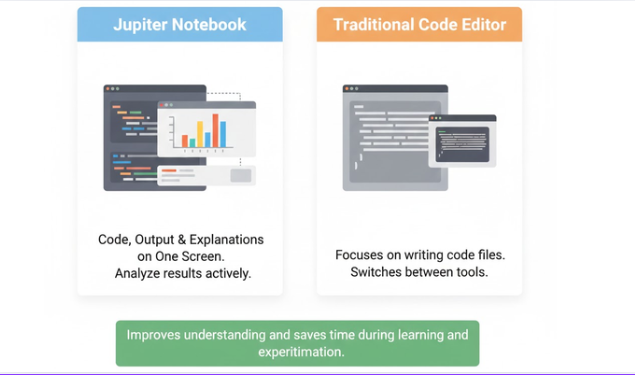
How this Notebook different from other code editors?
This displays code, output, and explanations on one screen.
Users actively analyze results without switching tools.
Traditional editors focus mainly on writing code files.
Therefore, it improves understanding and saves time during learning and experimentation.
Can Jupiter Notebook be used for professional work?
Many professionals use This Notebook for real-world projects.
Data analysts actively use it for reports and visualizations.
Teams also share notebooks for collaboration.
Because of these features, companies trust Jupiter Notebook for research and data-driven tasks.
Call to Action (CTA)
Elevate Your Website’s Growth with Professional SEO & Content Solutions
Are you finding it difficult to improve your Google rankings or reach the right audience? Moreover, do you want content that not only reads well but also delivers measurable outcomes? With hands-on experience in strategic keyword research, SEO-focused content creation, and effective on-page SEO, I help websites strengthen their online presence, increase traffic, and improve conversions.
Here’s how I can support your growth:
- Keyword Research: Identify profitable, low-competition keywords that align perfectly with your niche
- Content Writing: Develop compelling, SEO-optimized content that engages and converts readers
- On-Page SEO: Enhance titles, meta descriptions, headings, images, and internal links to improve search visibility
Whether you’re a blogger, business owner, or digital marketer, I offer result-driven SEO strategies tailored to your specific goals.
💡 Get Started Today!
Email me at zarirahc@gmail.com, and let’s explore how we can improve your website’s traffic, engagement, and overall performance.
Meanwhile, don’t delay—your competitors are already investing in SEO. Take the next step and move your website forward today!














Post Comment
You must be logged in to post a comment.