Google Colab: The Ultimate Guide for Beginners (2026)

Introduction
Learning programming and machine learning can feel difficult at first.
However, Google Colab is one of the right tools that makes the process much easier.
One popular tool is Google Colab.
Many students and developers use it every day.
It allows you to write and run Python code directly in your browser.
Therefore, you do not need to install any software.
Moreover, it is completely free.
That is why beginners love it.
In this article, you will learn what Google Colaboratory is.
You will also learn how this online Python notebook works and why people use it.
Read More: Ultimate Guide to K-Means Clustering Made Simple
What Is Google Colab?
It is a free cloud-based tool.
Also, allows users to write and run Python code online.
It is also called Google Colaboratory.
However, most people simply call it Colab.
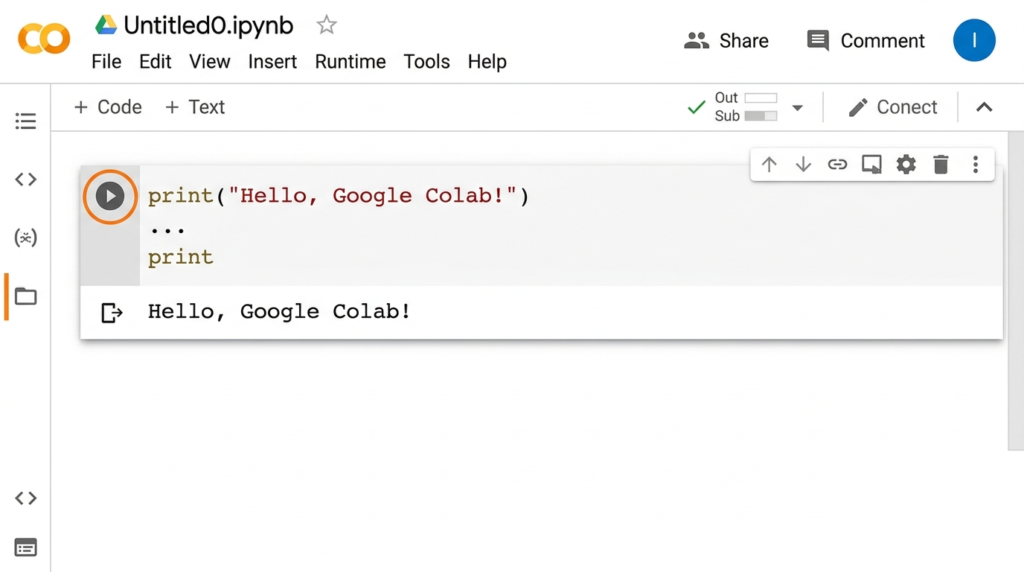
You can create notebooks in Colab.
These notebooks contain code, text, and results.
As a result, it becomes easy to test ideas.
You can also share your work with others.
Furthermore, everything runs in the cloud.
So, your computer does not need high power.
Why Colab Notebooks Are Popular
It has become very popular in recent years.
As a result, many data scientists and students use it.
In fact, there are several reasons for this popularity.
First of all, it is free to use.
Therefore, anyone with a Google account can start.
Secondly, you do not need installation.
Instead, everything runs directly in the browser.
Thirdly, it supports Python.
Moreover, Python is the most popular language for AI and data science.
Finally, it allows easy sharing.
You can send your notebook link to others.
Main Features of Google Colab
It offers many useful features.
These features make coding easier and faster.
1. Free Cloud Environment
Google provides free computing power.
Therefore, you can run programs without using your own computer.
This is very helpful for beginners.
2. GPU and TPU Support
Some programs need strong hardware.
For example, machine learning models need GPUs.
It provides free GPU access.
As a result, training models becomes faster.
3. Easy Sharing
You can share notebooks with a simple link.
This feature works like Google Docs.
Therefore, teams can work together easily.
4. Automatic Saving
Colab saves your work automatically.
So, you do not lose your progress.
This feature is very useful for long projects.
Read More: Clustering in AI and Machine Learning: Everything You Need to Know
How to Use Google Colab
Using Colab is very simple.
In fact, you only need a Google account.
Follow these steps.
Step 1: Open It
First, go to the Google Collaboratory website.
Then sign in with your Google account.
Step 2: Create a New Notebook
Next, click New Notebook.
After that, a new coding page will open.
Step 3: Write Python Code
Now, you can start writing code.
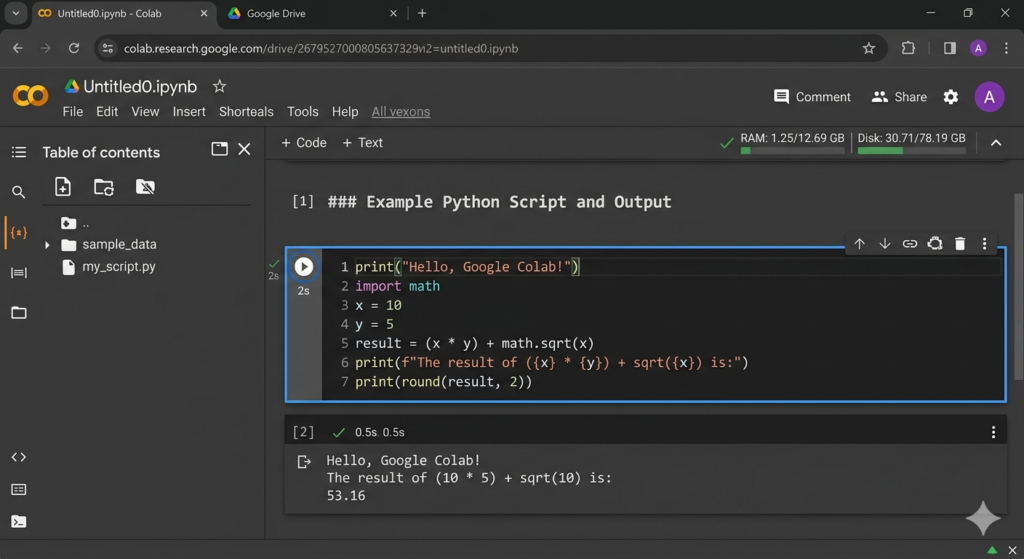
In this online Python notebook, each block is called a cell.
After that, click the run button.
Your code will execute immediately.
Step 4: Save Your Work
Finally, save your notebook.
It will store in your Google Drive.
Who Uses It?
Many people use Google Colab today.
It is popular in many fields.
For example, students use it to learn Python.
Teachers also use it to explain coding.
In addition, data scientists rely on it for experiments.
Machine learning engineers also use it.
Even researchers prefer it sometimes.
This is because it is simple and fast.
Python coding in a browser for Machine Learning
Machine learning needs strong computing power.
However, many beginners do not have powerful computers.
Python coding in a browser solves this problem.
It provides free GPU access.
Therefore, training models becomes easier.
You can also install many libraries.
For example:
- TensorFlow
- PyTorch
- NumPy
- Pandas
As a result, it becomes a great tool for AI learning.
Advantages of Google Colab
Google Collaboratory has many advantages.
First of all, it is free.
Therefore, you do not need to pay anything.
Secondly, it works online.
As a result, you can use it from anywhere with internet.
So, you can access it anywhere.
Third, it supports powerful hardware.
This includes GPU and TPU.
Fourth, it integrates with Google Drive.
Therefore, file management becomes simple.
Finally, sharing projects is easy.
Read More: Text-to-Speech:A simple and Complete AI Voice Guide for 2026
Limitations of Machine learning notebook
Although Colab is powerful, it has some limits.
Sometimes sessions disconnect automatically.
Therefore, long tasks may stop.
Also, internet connection is required.
Without internet, it will not work.
Another limit is usage time for GPUs.
Free users cannot run them forever.
However, these limits are small for beginners.
Tips for Beginners
If you are new to the Machine learning notebook, follow these tips.
First of all, start with simple Python programs.
In the beginning, do not start with complex projects.
Secondly, learn how cells work.
In fact, cells are the main part of Colab notebooks.
Thirdly, save your notebooks often.
This way, you can keep your work safe.
Although auto-save works, checking is good.
Finally, explore tutorials online.
Practice will improve your skills.

Conclusion
Machine learning notebook is a powerful and simple coding tool.
It allows users to run Python code in the browser.
Moreover, it is free and easy to use.
Beginners can start without installing anything.
It also provides GPU support.
Therefore, it is perfect for machine learning.
Many students and developers use it every day.
For this reason, learning Google Colab is a smart choice.
If you want to learn Python or AI, start with Google Colab today.
Read More: Coursera: Complete Guide to Online Courses and Degrees
FAQs About Google Colab
1. What is Google Colab used for?
Machine learning notebook is mainly used to write and run Python code online. In addition, it helps users test programs and learn coding easily.
2. Is Google Colab free?
Yes, the machine learning notebook offers a free version. Therefore, anyone with a Google account can start using it.
3. Do I need to install software for Google Colab?
No, you do not need to install any software. Instead, it works directly in your web browser.
4. Can beginners use Google Colab?
Yes, beginners can easily use Google Colab. In fact, it is simple and beginner friendly.
5. Does Google Colab support Python?
Yes, Google Colab supports Python. Moreover, Python is the main language used in Colab..
6. Can I run machine learning models in Colab?
Yes. It supports machine learning libraries.
7. Does Google Colab provide GPU?
Yes. Free GPU access is available for users.
8. Where are Colab notebooks saved?
They are saved in Google Drive.
9. Can I share my notebook with others?
Yes. You can share it using a link.
10. Is Google Colab good for students?
Yes. Many students use it to learn programming.
11. Can I use TensorFlow in Google Colab?
Yes. TensorFlow works well in Colab.
12. Does Google Colab work on mobile devices?
Yes. However, it works best on a computer.
13. Is internet required for Google Colab?
Yes. It is a cloud-based tool.
14. Can I upload datasets to Colab?
Yes. You can upload files easily.
15. Is Google Colab better than Jupyter Notebook?
Both are useful. However, Colab is easier for beginners because it runs online.
🚀 Ready to Level Up with Google Colab?
I help with: SEO Blog Writing
Tech Article Writing
Python & AI Content
Keyword Research & Optimization
Google Colab Tutorials & Setup Guides
If you want professional help or project support, contact me now:
Let’s build and rank your content together!














Post Comment
You must be logged in to post a comment.