ChatGPT for Content Creation: A Simple Step-by-Step Guide
Learn how to use ChatGPT for content creation to save time, boost creativity, and grow your online presence with this step-by-step guide.
Introduction: From Blank Cursor to Breakthrough
If staring at a blinking cursor were a sport, many of us would have gold medals. Creating high-quality content consistently can feel overwhelming. Blog posts, social media updates, email newsletters, and product descriptions all demand time, creativity, and strategy. Free AI voice generator with multiple languages and accents
Enter ChatGPT for content creation. This AI-powered tool is transforming the way creators, marketers, and business owners produce content. With ChatGPT, you can generate ideas, draft articles, and even optimize your content for SEO—all faster than traditional methods. Newest AI Technology Trends in 2026 You Should Know
In this guide, we will explore how to use ChatGPT for content creation step by step. You’ll learn common pitfalls, advanced tips, and practical prompts that make AI a true partner in your creative workflow. By the end, you’ll be ready to leverage ChatGPT to save time, boost creativity, and grow your online presence.
Latest AI Funding News: Where Investors Are Putting Their Money
What Is ChatGPT and Why Does It Matter for Content Creation
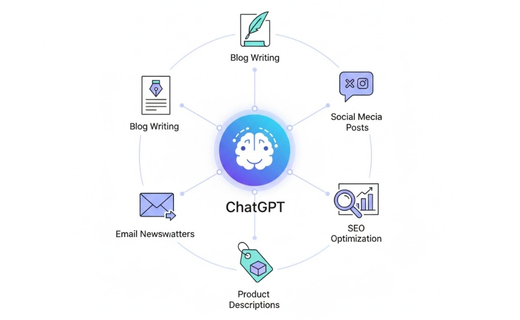
ChatGPT is an AI-powered language model developed by OpenAI that can generate human-like text in response to prompts. Think of it as a highly skilled writing assistant available 24/7.
Capabilities of ChatGPT:
- Writing blog posts and articles
- Generating social media captions and hashtags
- Crafting email newsletters and campaigns
- Producing product descriptions and sales copy
- Drafting SEO-friendly content Text-to-Speech:A simple and Complete AI Voice Guide for 2026
Why ChatGPT Matters
Creating content manually is time-consuming. AI can help you:
- Save hours of work: Generate drafts instantly.
- Overcome writer’s block: Get fresh ideas when inspiration is low.
- Stay consistent: Maintain a regular posting schedule without burnout.
- Boost creativity: Explore different perspectives and content angles.
Busting Common Myths
Some believe AI content is robotic or lacks authenticity. In reality, ChatGPT mirrors the instructions you give it. By providing clear, detailed prompts, you can produce content that matches your brand voice. It doesn’t replace human creativity—it enhances it. Laptop vs Chromebook vs Notebook: Everything You Need to Know
My Personal Journey with ChatGPT
I was skeptical at first. How could a robot capture my tone, humor, or unique perspective? But when deadlines piled up and content demands increased, I decided to test ChatGPT.
Initially, I struggled with prompts. A vague instruction like “Write a blog post” returned generic results. But over time, I learned that specific prompts, structured outlines, and editing make AI a powerful assistant.
Now, ChatGPT is like having a full-time content assistant in my pocket. It handles initial drafts and idea generation while I focus on adding human insight, stories, and authenticity. This combination of AI and human touch is a game-changer. Best Budget Laptop for Students (Save Money Now)
Common Mistakes Beginners Make and How to Avoid Them
Even with AI, mistakes can happen. Here’s how to avoid common pitfalls:
Mistake 1: Vague Prompts
Generic prompts produce weak content.
Fix: Be specific.
Example Prompt: “Write a blog post outline for women starting a handmade jewelry business, including Pinterest marketing tips.”
Mistake 2: Copy-Pasting Without Editing
AI drafts are starting points, not final content.
Fix: Add your voice, stories, and examples. Polish every draft for authenticity.
Mistake 3: Using AI Without a Strategy
Random content creation leads to inconsistency.
Fix: Focus on one content type at a time. Batch blog posts, emails, or social media content with clear goals.
Pro Tip: I once asked ChatGPT to write Instagram captions without context. The result was uninspiring. Once I included my target audience and campaign goals, engagement improved dramatically. SEO for Attorneys: 7 Proven Ways to Get More Legal Clients
Step-by-Step Guide to Using ChatGPT for Content Creation
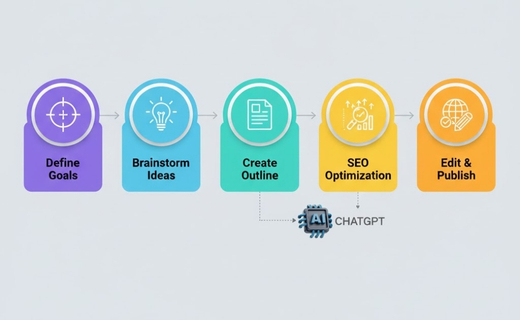
1. Define Your Content Goals
Before writing, clarify your objective. Are you producing:
- Blog posts
- Social media updates
- Email newsletters
- Product descriptions
Example Prompt:
“Help me write a 500-word blog post about the benefits of remote work for small businesses.”
AI Translation Earbuds Masterclass: Everything You Need to Know
2. Brainstorm Content Ideas
Use ChatGPT to generate multiple content ideas.
Example Prompt:
“Suggest 10 blog post ideas about digital marketing trends in 2025.”
Tip: Explore ChatGPT alternatives for content creation like Claude AI, Perplexity AI, or Gemini AI for unique perspectives.
3. Create a Structured Outline
A clear outline ensures organized, readable content.
Example Prompt:
“Create a blog post outline titled ‘How to Use ChatGPT for Content Creation’ with an intro, 5 main sections, and a conclusion.”
4. Write Your First Draft
Let ChatGPT draft content based on your outline.
Example Prompt:
“Write a 300-word introduction for a blog post about using ChatGPT for content creation.”
Tip: Generate multiple drafts and select the best version for editing.
Best AI for Translation (2026): Tools, Tips & Real Results You Need to Know
5. Optimize Content for SEO
Include your focus keyword naturally. Add meta descriptions, internal links, and image alt text.
Example Prompt:
“Incorporate the keywords ‘ChatGPT for content creation,’ ‘content creation tips,’ and ‘AI writing tools’ into this blog post.”
6. Edit and Refine for Uniqueness
Human touch is essential. Add:
- Personal anecdotes
- Data or statistics
- Case studies
- Humor or tone aligned with your brand
Tip: Always run the content through plagiarism checkers and readability tools. Unlock Stunning Logos Instantly with These AI Tools (Free Guide)
7. Repurpose Content
Maximize content ROI by converting blog posts into:
- Social media posts
- Email sequences
- Video scripts
- Infographics
Example Prompt:
“Turn this blog post into 5 Twitter threads about ChatGPT for content creation.”
Advanced Tips and Best Practices

Treat ChatGPT as a Team Member
Provide context and clear instructions for better output. The AI performs best when it understands your objectives.
Save Your Best Prompts
Maintain a “prompt vault.” Copy and paste successful prompts instead of rewriting from scratch.
Customize AI Responses
Use the “Customize ChatGPT” feature to personalize tone, voice, and brand style. Include details like your niche, target audience, and content goals. Choosing the Best Lenovo Business Laptop in 2026 – Complete Guide
Blend AI with Human Creativity
AI handles structure, drafts, and ideation. Human insight adds emotion, storytelling, and authenticity, which AI alone cannot replicate.
Explore Alternatives for Diversity
Tools like Claude AI, Perplexity AI, and Gemini AI provide alternative content ideas or unique stylistic approaches. Using multiple tools keeps your content fresh.

SEO and Strategy Insights
- Include focus keyword in at least 1-2 headings
- Use transition words like “therefore,” “moreover,” and “in addition”
- Keep paragraphs short (2–4 sentences)
- Mix sentence beginnings to avoid monotony
- Add internal links to other MinsaAI resources
- Include external links to authoritative sources for trust signals
- Use images, videos, and infographics to boost engagement and dwell time
Conclusion and Call to Action
ChatGPT for content creation is a revolutionary tool for bloggers, marketers, and business owners. By combining AI efficiency with human creativity, you can produce high-quality, engaging content faster than ever. Affordable to Pro: Best Laptops for Ethical Hacking That Actually Work
Take action today: Start experimenting with prompts, build your “prompt vault,” and customize ChatGPT to match your brand.
Ready to supercharge your content strategy?
Call us at 03110115488 or email choudryabdulrehman0@gmail.com to get personalized support in creating content with ChatGPT. Let us help you save time, boost creativity, and grow your online presence today.
FAQs: ChatGPT for Content Creation
General Overview
1. What is ChatGPT for content creation?
ChatGPT for content creation is an AI-powered tool that helps writers, marketers, and businesses generate high-quality text quickly. It can create blog posts, social media captions, product descriptions, email newsletters, and more using intelligent prompts.
2. How does ChatGPT generate content?
ChatGPT generates content using a large language model trained on vast text data. It predicts and generates human-like text based on your instructions, adapting tone, style, and context according to the prompts you provide.
Content Creation Framework
3. What are the 7 steps of content creation?
The seven steps of content creation are:
- Define your goal
- Research your topic
- Brainstorm ideas
- Create an outline
- Draft content
- Edit and optimize
- Publish and promote
Using ChatGPT can automate steps 3–5, saving time and improving productivity.
4. What are the 5 C’s of content creation?
The 5 C’s of content creation are: Clarity, Consistency, Creativity, Context, and Customer-focus. ChatGPT helps enhance these by generating clear, consistent, and creative content that aligns with your audience’s needs.
5. What are the 4 C’s of content creation?
The 4 C’s are Content, Context, Consistency, and Creativity. ChatGPT can assist by producing content that maintains consistency and relevance while giving creative ideas.
Practical Use of ChatGPT
6. Can ChatGPT write entire blog posts?
Yes, ChatGPT can write full blog posts. However, it is recommended to edit and personalize the content for accuracy, uniqueness, and brand voice before publishing.
7. How do I make ChatGPT content unique?
To make ChatGPT content unique, add personal insights, examples, data, and a human touch. You can also use plagiarism checkers and rewrite portions to fit your brand style.
8. Is ChatGPT good for SEO content?
Yes, ChatGPT can generate SEO-friendly content by including keywords, meta descriptions, headings, and alt text for images. Make sure to refine it for readability and relevance.
9. What are the best ChatGPT prompts for content creation?
Some effective prompts include:
- “Write a blog post about [topic].”
- “Generate 10 headlines for [niche].”
- “Create an outline for [topic] blog post.”
- “Write social media captions for [product/service].”
10. Is ChatGPT free to use?
ChatGPT offers both free and paid versions (ChatGPT Plus). The free version is sufficient for most content creation tasks, while the paid version provides access to more advanced features and faster response times.
Workflow & Efficiency
11. How can ChatGPT improve my content workflow?
ChatGPT streamlines your workflow by generating ideas, drafting outlines, creating content, and suggesting improvements. This saves time, reduces writer’s block, and allows you to focus on strategy and promotion.
12. Can ChatGPT replace human writers?
No, ChatGPT is a tool to assist human writers, not replace them. While it helps create content faster, human creativity, expertise, and editing are essential to make content authentic, accurate, and engaging.
13. How do I give ChatGPT the right prompts for better results?
Be specific in your instructions. Include your audience, goal, tone, style, and required structure. For example:
“Act as a marketing expert and write a 500-word blog post on AI tools for small businesses, targeting beginners with a friendly tone.”
14. Can I use ChatGPT to repurpose content?
Yes, ChatGPT can convert blog posts into social media captions, email newsletters, scripts, or summaries. This allows you to maximize the reach and value of a single piece of content.
15. How often should I use ChatGPT for content creation?
Use ChatGPT regularly for brainstorming, drafting, and repurposing content, but always review, edit, and add a human touch. This ensures content stays relevant, accurate, and aligned with your brand.











Post Comment
You must be logged in to post a comment.